
 Operate
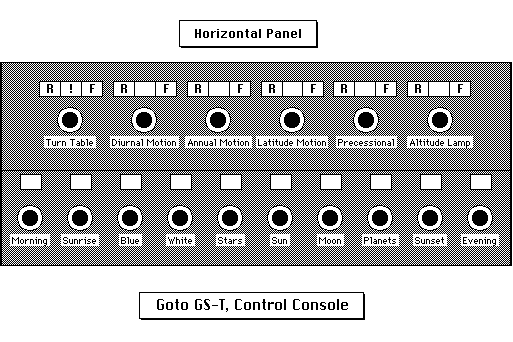
the star projector with the horizontal control panel in the following
ways:
NOTE: For all star projector dimmer control knobs that fade projector lamps up and down, clockwise rotation (to the right) increases brightness, while counterclockwise rotation (to the left) decreases brightness. Setting the knob as far to the left as possible turns the projector off.
|
|
|
|
|
|
far left |
|
|
In the actual city sky, human-made twilight often reaches 30° above the horizon. Show the effects of such light pollution on the starry sky by keeping this projector on while bringing up the stars. Then fade it out slowly. |
|
2nd from left |
|
|
Rotate the knob at a steady speed. |
|
3rd from left |
(Moon Light) |
|
Produces the brightness of a moonlit night; also used at twilight or dawn. |
|
4th from left |
(Daylight) |
|
Also used to illuminate the room before or after a presentation. |
|
5th from left (near middle) |
|
|
1. To prolong the life of the bulbs that project the fixed stars, always turn the fixed stars on slowly. Go from off to fully on in no less than two seconds. 2. To turn them on suddenly, in one quick turn of the knob, risks blowing out the bulbs and shocks them with a surge of current that decreases their longevity. 3. Once they are fully on, turn them down 1/10th of a turn or so, which allows the magnitude-differences to become more apparent. |
|
5th from right (near middle) |
|
|
1. Fade away before sunset so that it will not project below dome. 2. Partially fade to calibrate the Sun's center with the dots on the ecliptic. |
|
4th from right |
|
|
Shows naked eye features and phases; controlled with annual motion. |
|
3rd from right |
|
|
1. The knob controls all 5 planets simultaneously. 2. Planets will automatically rise and set at the horizon. |
|
2nd from right |
|
|
Rotate the knob at a steady speed. |
|
far right |
|
|
Rotate the knob at a steady speed. |
 ©1997
Welcome to the Planetarium web site provided by the OBU Planetarium. These pages have been written by the Planetarium Director, Kerry Magruder; the Unified Studies Natural Science Coordinator, Mike Keas; other OBU faculty; and the students who work in the planetarium.
These web pages may be printed, copied, and distributed for educational use by any non-profit educational group so long as they are not edited or altered in any way, nor distributed for profit, nor repackaged or incorporated into any other medium or product, and so long as full credit is given to the OBU Planetarium.
This page and many others from the same web site may be accessed from the OBU Planetarium Home Page.


Our web pages are never finished, but always under construction! The formatting of our web pages may be unintelligible if you are not using Netscape 2.0+. If you find a link that does not work, please tell us which link does not work--and which page you are on. Contact us by Email with general inquiries or suggestions. Thank you.
 Page made with HyperNote
and Claris Home Page
Kerry Magruder, Planetarium Director, Home
page or Email
Mike Keas, Unified Studies Natural Sciences Coordinator,
Home page
 General
OBU Home Page